Posts

Showing posts with the label Tech Tip

Tech Tip: Canvas Notification

This week I decided to look at my notifications on Canvas. I decided to change up the notifications that I get on my phone. I receive a lot of notifications, specifically for discussions, which kind of annoy me. I decided to change them up. I like that Canvas offers so many different styles of notification set ups.

Tech Tip: Announcements Email

I decide to subscribe to getting emails for this course. I think that it'll be nice to be further in the loop for this class. These announcements are really helpful. They are so detailed and provide great information. I don't know why it has taken me so long to subscribe to these emails!

Tech Tip Poster

Image
AutoMotivator I created this AutoMotivator. Sometimes it is easy to think of all the negatives, but remembering that anything is possible is important. I used the random image on the website and was able to create this.

Tech Tip: Canvas Profile

For this Tech Tip, I decided to edit my canvas profile. I already had a picture on there. I chose a picture that was from my Senior pictures back in high school. I know those pictures are from a long time ago, but I really like the way that they look! So that is why I chose that picture. I also decided to include a bio for my canvas profile. I just put that I am a senior Human Relations major. I feel as if this is all that is needed on a canvas profile.

Tech Tip: Browser Bookmarks

Bookmarks are a really useful part of a computer. I just started using them recently. I usually bookmark the website that I use the most common, but more specifically those that are school related. These bookmarks are on my tool bar. That way it is just one click away. I have a couple bookmark for other items. For instance, I have a whole bookmark for recipes. I am not a huge cook, but if I find an easy recipe that I think would be good, then I bookmark it! I also have another bookmark for stories that I want to read in this class. Lucky for me, I have been able to as they fit with the specific weeks that we have done so far! I am really happy with the way that my bookmarks are set up. It drives me crazy when bookmarks go all the way across the browser, so the bookmarks on my toolbar are the most important sites for me.

Tech Tip: Twitter Follow

Image
I decided to follow Lincoln Riley on twitter. As the head coach for OU football, I thought that it would be fun to see what he tweets throughout football season. He seems like a nice guy and a great coach, so I am hoping that his twitter account is the same! The reason I chose Lincoln Riley was because I was thinking of football because OU/TX is next weekend. I hope that he can lead us to another Sooner victory in Dallas! Lincoln Riley Boomer!

Tech Tip: Google Define

Image
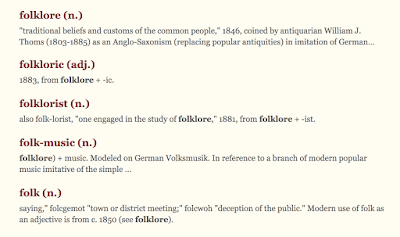
The word I looked up was folklore . The course is called myth and folklore, so I wanted to learn more about the word folklore itself. I never knew that it began in 1883  screenshot of folklore from etymonline There are a bunch of different types of words that incorporate folk into it. I think that it is really neat!  I do find myself searching words that I don't know or want to know more about on Google. Google has really easy ways to look up words which is very convenient and helpful!

Typing Game Tech Tip

I enjoyed these typing games. I used to be really into learning how to type. As dorky as this sounds, it really helped me out because I consider myself a good and fast typer. These games were entertaining but also helped me practice my typing. My favorite was  Type For Your Life . It was fun to see if I could type the word before I died.

Tech Tip: Canvas Mobile App

I have had the Canvas Mobile App on my iPhone for awhile now. I find it extremely helpful. It shows me when grades are put in. It also shows me when I receive and email from my professors. Having access to all of your classes and their information anytime and anywhere is a major advantage. If I think I forgot an assignment then I have quick and easy access to the syllabus. The Canvas Mobile App is really helpful!

Tech Tip: Canvas Dashboard

I really like the Canvas Dashboard. It is really easy to customize the Dashboard as well. Once all of my classes are published for a semester, I usually color code each class. This is just a fun way to incorporate some flare into the Dashboard. I took Laura's advice and turned off the color lay feature for the courses. My professors have pictures set up so now it is easier to see what exactly the professors wanted to be shown! I also like how you can rename the courses. Usually they have the Course ID number and it can get confusing when all of your classes are HR. I really appreciate the Canvas Dashboard for being easy to navigate. D2L was confusing at times but Canvas was a good system to switch to.